The SMC MQTT Service in Fargate
Context Diagram
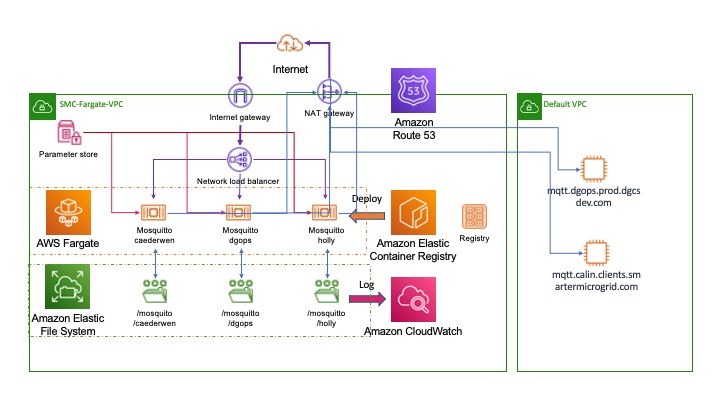
The diagram above illustrates a typical MQTT deployment created from the mqtt CDK template project. In the example three MQTT containers have been created:- caederwen, dgops and holly. The first two have been used to bridge to MQTT brokers in the existing EC2 infrastructure:- mqtt.dgops.prod.dgcsdev.com and mqtt.dgops.prod.dgcsdev.com respectively. Each broker has its own persistent file storage to maintain persistent messages and configuration. The broker name is used to identify this storage and, therefore, must be unique.
Consolidated logging is mastered in AWS CloudWatch and once again the log file names are derived from the broker id. Secret parameters (such as passwords or other sensitive data) are held in the AWS Parameter store and supplied to the broker instances at runtime.
The broker configuration files are auto-generated and a docker image constructed and loaded into the Elastic Container Registry(ECR) during the deployment to the MQTT stack using the AWS CDK infrastructure as code mechanism. These docker images are available in the ECR until they are manually removed or the registry expiry date is reached. This allows unsuccessful deployments to be rolled back to earlier successful ones.
The broker fargate task instances are fronted by a Network Load Balancer to simplify the DNS configuration through AWS Route 53 and for stability reasons as explained below - the NLB is able to use an elastic IP address to ensure that the brokers do not "hop" Ip address too frequently. A NAT gateway enables the brokers to access other VPCs or, indeed, yje internet to create bridges.
A Word on IP Addresses
Our experience has been that fargate containers change their IP addresses significantly more frequently that is the case for EC2 instances. There are many reasons why this can happen, for example because a healthcheck fails (not uncommon in NodeJs applications) or because of a new deployment. This gives us some not insignificant problems.
Although we have a Lambda function which spots the change of IP address for a service and then automatically updates the DNS entry im Route 53 this still causes drop-outs. In particular where a client has cached the IP address connections are lost until:-
-
The client times out on the previous connection; and
-
The DNS entries have propagated
Perhaps even more importantly the IP address is wound, by default, into the MQTT client Id. Changing IP addresses can place a significant extra load on the MQTT brokers. When an IP address changes the broker sees this as a new client - the client id is, after all, different. Because persistent messages are being used the broker now needs to maintain state for two clients, the one that connected before the IP address changed and the new ID. They are, however, the same client and the "old" one will never reappear, but the broker is left managing its state until the client expiry period has elapsed - often seven days. During a period of change the load on the broker can be significant as the client ids for every client is changing. Worse still as the fan-out on a broker increases because new environments being created this problem multiplies.
Because of this we have made two changes:-
-
The introduction of the Network Load Balancer and an elastic IP address to avoid the connection dropouts; and
-
Provide bridge brokers within Fargate to reduce the fan-out on the existing EC2 brokers;
-
A move to a more static form of client id based on the service name and identify that keeps the id of an individual service component constant
The Anatomy of a Broker IaC Deployment
The Context diagram above shows a deployment with three broker instances. Each is defined by an instance of the interface MqttBrokerInstance in the file brokers.ts in the CDK template directory. As an example we will look at the definition for the caederwen broker it has the following basic characteristics:-
-
It is attached to persistent storage and uses a directory /mosquitto/caederwen to hold its configuration files and persistent message database;
-
It is available externally on the internet on port 1883;
-
Disconnected client entries will be removed after seven days;
-
Subscribe requests will be logged to AWS Cloud Watch;
-
Access is password protected to the user 'smc', the password for which is in the AWS System Parameters;
-
A bridge is established to the calin MQTT broker in the EC2 infrastructure;
The full specification for the broker instance is illustrated below, we shall look at each element in turn to understand how this becomes an active MQTT broker running in Fargate.
/**
 * @public
 * Broker definition with persistence, Logging, and a single Bridge
 */
export const caederwen:MqttBrokerInstance = {
    id:'caederwen',
    efsAccessPoint: 'fsap-072cfe58068d25a3d',
    port:1883,
    autosaveInterval: 1800,
    logType: 'subscribe',
    userName: 'smc',
    passwordHandle: 'Smc-Infra-Mqtt-Password',
    client_expiry: '7d',
    bridges: [{
        id:'calin-clients',
        brokerClientId: 'caederwen-bridge-client@bridge-caederwen.fargate.smc.local',
        broker: {
            host: 'mqtt.calin.clients.smartermicrogrid.com',
            port: 20287,
            userName: 'calin-meters-mqtt',
            passwordHandle: '$CALIN_PASSWORD'},
        topics: [
            {
                topic: '#',
                direction: BridgeDirection.in,
                qos: QoS.AtMostOnce
            }
        ]

    }]
}
Identifier
The id parameter uniquely identifies the broker. It does not matter which cluster the broker is deployed to the name must be unique across all brokers. The CDK code will check this. In our case the identifier is caederwen. Specifying this will cause the deployed MQTT process to have the following features:-
-
The persistent storage will bne held in EFS under the directory /mosquitto/caederwen - we shall discuss how the link is formed between the container and EFS below.
-
A Fargate task definition will be created with the name
MqttStackmqtttaskcaederwen<version> -
A Fargate service with the name
MqttStack-mqttcaederwenserviceService<version> will be instantiated in the default or specified cluster -
A DNS entry will be created in Route 53 for
mqttcaederwen.fargate.dgcsdev.com -
A service discovery entry will be created and registered as
mqtt-caederwen.fargate.smc.local
EFS Access Point
The efsAccessPoint attribute holds the ARN for the root of the persistent storage where the MQTT instance will keep its configuration and data files. This value can be found from the AWS console by choosing Amazon EFS and the FileSystems. Here a root directory called /mosquitto has the ARN shown in our example above. The deployment of the docker image will create a directory called /mosquitto/caederwen and will then use variable substitution on a standard template to:-
-
Create a mosquitto.conf configuration file;
-
Create an encrypted password file using the usernames in the CDK object and the passwords from the AWS System Parameters
-
Create a bridge configuration file that can be included by the main config file
Port
This is the port that the MQTT broker will listen on for incoming connections. Note that this too must be unique as the port number is the only way to discriminate between brokers on the Network Load Balancer. The supplied port value will be used as follows:-
-
A listener entry will be created in the mosquitto.conf file to cause the Mosquitto instance to listen on this port. The entry is translated in the config file to:-
# Port to use for the default listener.
port ${PORT}-
A Network Load Balancer(NLB) target will be created for this port to provide an external access to the broker at mqtt-gate.fargate.dgcsdev.com:<port>
In our example the caederwen broker will be available at mqtt://mqtt-gate.fargate.dgcsdev.com:1886
| Adding a new PORT to the infrastructure will require a rule in the default security group (see template.js) to allow access to it. Failure to do this will cause the container health checks to fail and for the service to be continuously redeployed in a loop. |
Auto Save Interval
The number of seconds that mosquitto will wait between each time it saves the in-memory database to disk. If set to 0, the in-memory database will only be saved when mosquitto exits or when receiving the SIGUSR1 signal. In our example this is set to 1800 seconds or every half hour.
Log Type
Will create a log_type entry in the Mosquitto configuration file prior to deployment using the specified log value. In teh example here this will create an entry of th eform:-
log_type subscritionsUser Name & Password
These two elements will be combined to create a line in the Mosquitto password.txt file during the deployment of the docker container. This is done through the following mechanism:-
The passwordHandle value is used to recover a password from the AWS Systems Parameters and this is written into a local file in the mosquitto persistent storage called password.txt. The format of the rows in the password.txt file will be:-
<userName>:<password from Systems Parameters>The password entries will then be encrypted by running mosquitto_passwd on the file.
Client Expiry
This option allows persistent clients (those with clean session set to false) to be removed if they do not reconnect within a certain time frame. This is a non-standard option. As far as the MQTT spec is concerned, persistent clients persist forever.
Badly designed clients may set clean session to false whilst using a randomly generated client id. This leads to persistent clients that will never reconnect. This option allows these clients to be removed. Fargate clients have some of these characteristics as their IP address changes
The expiration period should be an integer followed by one of h d w m y for hour, day, week, month and year respectively. For example:
-
persistent_client_expiration 2m
-
persistent_client_expiration 14d
-
persistent_client_expiration 1y
Bridges
The MQTT broker definition may optionally include a specification for one, or more, bridge definitions. A simple broker would normally have no Bridge definition, but it can be useful to use a bridge where, say, a Fargate set of clients wishes to consume messages from legacy infrastructure. Constructing a bridge reduces the fan-out on the legacy component particularly given the IP change issues we discussed earlier. A typical bridge specification appears in our example. Note that the syntax for the bridges component allows an array of bridge specifications - a Fargate broker could bridge to, and map, multiple legacy brokers.
Bridge Identifier
The id element of Bridge definition is used to create a bridge connection entry in the mosquitto.conf file. The id will be used to write a connection statement in the configuration file with the name of the connection set to the value of the id.
Broker Client Id
If set the brokerClientId will be used as the value for the remote_clientid statement of tyhe bridge connection - i.e the name that the consumer will use during connection. If the value is not supplied one will be generated. A generated id will not include elements that can change such as IP address or hostname.
Broker
The broker object identifies the remote MQTT broker to which the bridge should be established. It expects to be supplied with the following attributes:-
attribute |
value |
host |
IP address or DNS name for the remote broker |
port |
TCP port number that should be used in the MQTT connection |
userName |
User id to supply in the connection to the remote broker |
passwordHandle |
The name of an environment variable in the broker deployment that has been populated with a password from the Systems Parameters and can be used to connect to the remote broker |
Topics
The topics attribute takes an array of elements that describe:-
-
The topic(s) to listen to across the bridge;
-
The direction in which topic messages may flow - a value of type BridgeDirection which may be in, out or both
-
A value for the Quality of Service to use which will be a value of the QoS enumeration and may have the value "AtMostOnce", "AtLeastOnce" or "Exactly Once"
Enumerations
/**
 * @enum Mqtt Bridge Direction
 * @public
 */
export enum BridgeDirection {
    in ='in',
    out = 'out',
    both = 'both'
}

/**
 * @enum Quality of Service
 * @public
 */
export enum QoS {
    AtMostOnce = 0,
    AtLeastOnce = 1,
    ExactlyOnce= 3
}
Generated Connection Configuration
For the example we have used on the caederwen mqtt broker the generated bridge configuration is illustrated below:-
# BRIDGES CONFIGURATIONS for caederwen
# Bridge Configuration for calin-clients
connection calin-clients
address mqtt.calin.clients.smartermicrogrid.com:20287
topic # in 0
remote_username calin-meters-mqtt
remote_password $CALIN_PASSWORD
remote_clientid caederwen-bridge-client@bridge-caederwen.fargate.smc.local